Introduction
The OAK ETStudio is a development and test Tool designed to All HIL and SIL Projects. With features like Analysis,Simulation and AI, it offers Trace, IG, Graphic,Panel and AI assistant capabilites.
The goal of analysis is to assess the data transmitted between ECUs and software functions. This involves examining a wide range of details, from raw physical measurements and digital binary data to structured protocol packets and symbolic signals, all of which can be presented and viewed in different windows.
Simulation involves creating a virtual environment that replicates the intended operational context for testing an ECU (hardware/software) or software function. This approach allows not only for evaluating the input and output behavior of the component but also for assessing its performance and interactions within a sophisticated or intricate system.
Simulation focuses on testing the input and output behavior of a system or component. Unlike simulation, it does not involve replicating an environment. Instead, it aims to evaluate specific sub-functions by applying targeted inputs based on predefined behavioral patterns and expected responses, ensuring the system reacts as intended under controlled conditions. AI provides code generation,comment generation capabilites to help fasten development efficiency.
Feature List
| Feature Type | Feature Description |
|---|---|
| Number of Channels | 32 |
| Frame Transmission | Supports raw frame, DBC database, and LDF database; configurable signal generator; transmission via C scripts |
| Frame Monitoring | Real-time display of raw frame; signal values shown after loading DBC/LDF files |
| Frame Filtering | Flexible configuration based on channel, ID, and signal value range |
| Data Logging | Directly recorded to computer hard drive; duration depends on drive capacity; file formats: ASC/BLF |
| Database Management | Load and parse DBC/LDF files |
| Frame Replay | Supports Offline/Online replay; directly replay ASC/BLF files |
| Statistical Info | Bus load, frame rate, error count, error frame rate, etc. |
| Script Editing | C++/C |
| Operating System | Windows 7/8/10/11 |
The role of ETStudio in the development of ECU projects
The first stage: full simulation network system
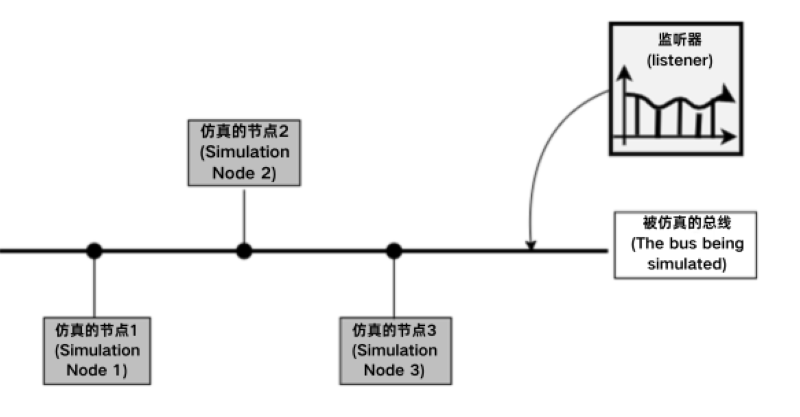
In the early stages of development, ETStudio is used to build simulation models on which the ECU is functionally evaluated. Event processing is carried out for packets with specific data definitions, and the behavior of network nodes is realized with the help of C++ (C language). C++ can be used to handle events such as packet reception, changes in system variables/environment variables, and the occurrence of errors.
Users can also extend the functionality of their own functions with existing mature algorithms, functions, and models. For complex models, other modeling tools (such as MATLAB) can even be used to simulate offline using the designed complete network simulation system to test the functional integrity of each node and the rationality of the network. Figure shows a schematic diagram of ETStudio's fully simulated network system, and all nodes are simulation nodes.
The second stage: real nodes and partial simulation nodes coexist
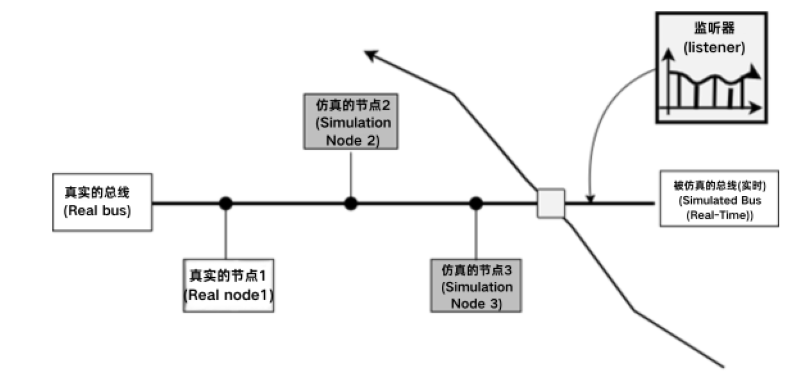
After the first stage, users can get a system functional model of the entire network. Users can then replace the corresponding simulation nodes in the simulation system with the real ECU nodes they develop. Use the bus interface to connect with the remaining nodes of ETStudio to test the functions of your own nodes, such as communication and error correction. For this reason, there are many occasions when project teams use Remaining Bus Simulation. In this way, nodes from each vendor can be developed in parallel and are not affected by the development process of other nodes. Figure shows the schematic diagram of the network system in which ETStudio real nodes and some simulation nodes coexist. Some nodes have been replaced by real nodes.
The third stage: a network system with all real nodes
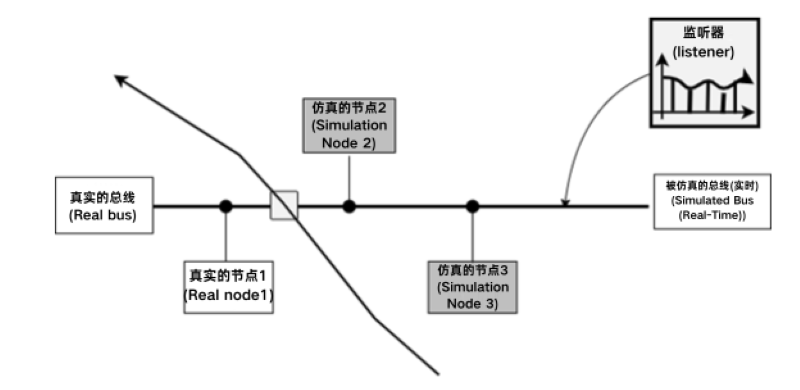
In the final stage of development, all the real nodes of the ECU are linked to the bus system one by one, and the previous simulation nodes are disconnected from the bus one by one. Developers can verify that the bus liabilities and other design requirements are met under the conditions of real nodes. At this stage, ETStudio primarily serves as a tool for network system analysis, testing, and diagnosis. In this process, the entire system, including various functional nodes, can be checked in detail. Since it is ideal to use simulation nodes instead of real network nodes, the switching between these two states can cross-check related functions and quickly locate the root cause of the problem. The figure shows the network system of ETStudio fully real nodes in figure, and all nodes have been replaced by real nodes.